What is the AC contact on a Casio, and how do I reset it?
If you've just changed the battery in a Casio digital and the screen is blank or showing garbage segments, the watch isn't broken — it needs a reset. Nearly every Casio digital module has a small contact point labeled AC next to the battery for exactly this.
The procedure: with the case back open and the new battery seated, short the AC contact and the battery's top (+) surface together for two or three seconds. Metal tweezers work — this is the one step where metal is the right tool — or a small screwdriver bridging the two points. The display should snap back to a default screen (often flashing 12:00). Close it up and set the time.
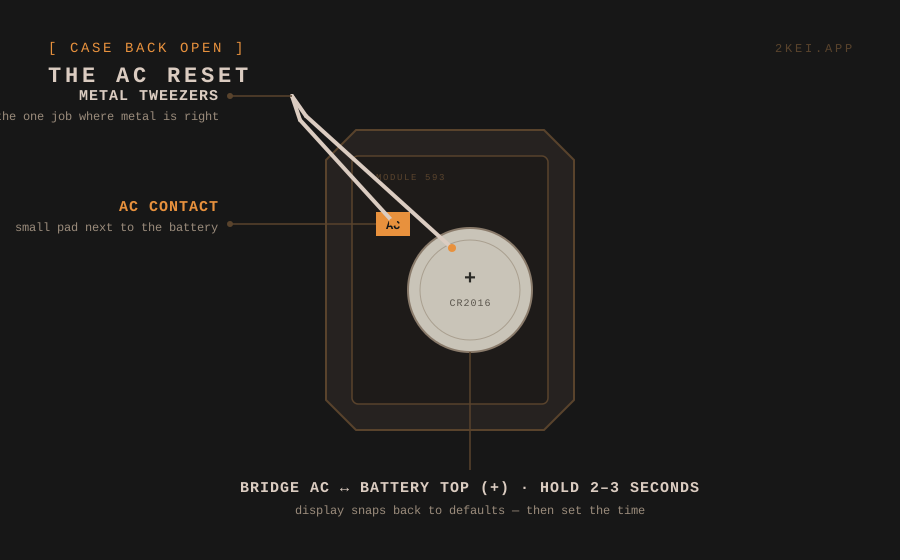
Why it exists: the module's memory can hold a corrupted state when power is cut and restored. The AC (All Clear) short forces the chip back to factory defaults — same idea as a reset pin on any electronic device.
If there's no AC label: some older or non-Casio modules reset by removing the battery, waiting thirty seconds, and reseating it. Others reset by holding all buttons simultaneously with the battery in. The module number on the case back plus "reset" in a search usually finds the exact method — Casio's official manual archive is organized by module number, and our database lists the module for every model we cover.
Still blank after a reset? Check the battery is the right type and seated the right way up, then check the small springs or contact strips around the battery bay haven't been bent. If those are fine, the module itself may have a problem — see the leak and corrosion guide, because old battery residue is the usual suspect.
NEVER FIND A DEAD WATCH IN A DRAWER AGAIN
2kei tracks every battery and reminds you before it dies.
→ START TRACKING