Casio not beeping: mute mode, or something broken?
A silent Casio is one of three things, and you can tell them apart in a minute without tools: a setting (most likely), a displaced spring (the classic), or a dead piezo (rare).
1. The mute setting
Many modules have a key-tone mute: when active, a mute indicator (a crossed-out note or "MUTE" flag, depending on module) shows on the display, buttons press silently, but alarms and the hourly chime still sound — that's the design. Toggling it is usually holding a specific button for a couple of seconds (commonly the mode or adjust button; the module manual states which — how to find it). If buttons are silent but your alarm still beeps, you're looking at the mute flag, nothing is broken.
2. The alarm contact spring
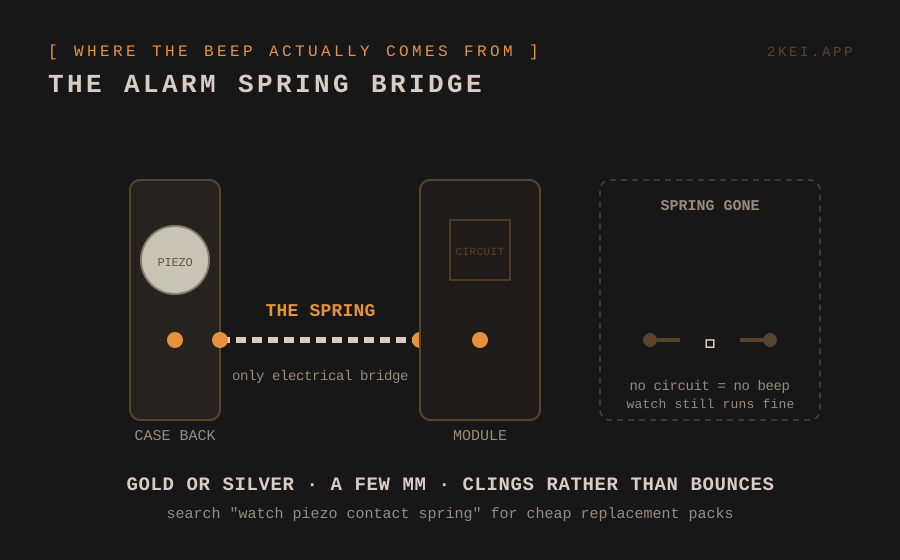
If NOTHING sounds — no key tones, no alarm, no chime — the sound circuit is open, and the number one cause is the tiny spring between the module and the case back's piezo disc: displaced, bent flat, or lost during a past battery change. Open the back and look for the small spring near the module's edge; it should stand vertical and touch the case back's contact point when closed. Re-seat it or replace it — the full rescue plan is in the lost spring guide.
3. The piezo disc itself
The thin metallic disc glued inside the case back is the speaker. Corrosion at its contact dot blocks the circuit (clean gently with isopropyl); a visibly cracked or lifting disc means faint, distorted or no sound and is the one genuinely annoying repair here — case backs with intact piezos are the usual donor-part solution.
Test sequence after any fix: close the back finger-tight, set an alarm one minute ahead, confirm the beep, then screw down properly. Nothing worse than sealing four screws and hearing silence.
A DIGITAL HOME FOR YOUR DIGITAL WATCHES
Collection, batteries, and the story behind each piece. Free to start.
→ START FREE