How do I change a watch battery myself?
Most digital watch batteries can be changed at home in under ten minutes with two or three basic tools. The main things that go wrong are using the wrong tool on the case back, shorting the module with metal tweezers, and forgetting the reset step afterward.
First, identify your case back. There are three common types. Snap-off backs have a small notch on the edge and pop off with a case knife or a thin blade. Screw-down backs have six notches around the rim and need a case back wrench (or, carefully, a rubber friction ball). Screw-plate backs, the most common on vintage Casio digitals, are held by four tiny Phillips screws — a precision screwdriver set handles these.
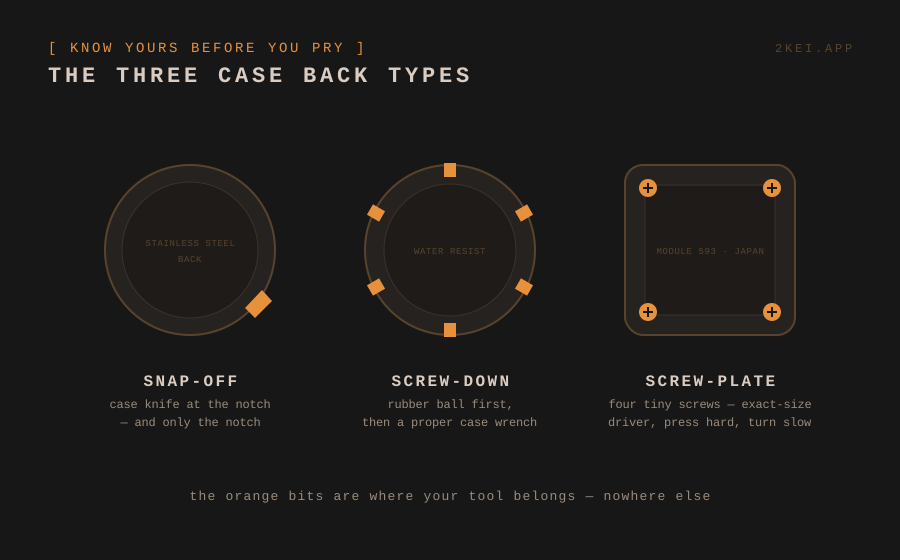
Tools worth owning: a case knife, a precision screwdriver set, plastic (not metal) tweezers, and a small tray so the screws don't vanish. Total cost is less than a single trip to a jeweler.
The swap itself: note which side of the battery faces up before removing it. Some batteries sit under a small metal clip or strap — release it gently rather than prying the battery out by force. Drop in the new battery of the exact same type (see our battery code guide), and don't touch the flat faces with bare fingers more than you have to.
Don't skip the reset. Many Casio modules need a quick reset after a battery change or the display stays blank — see the AC contact guide for the 10-second procedure.
When not to DIY: if the watch has real water resistance you rely on, a fresh gasket and pressure test need a watchmaker. And if the battery has leaked, stop and read the leak guide first — that's a different job.
NEVER FIND A DEAD WATCH IN A DRAWER AGAIN
2kei tracks every battery and reminds you before it dies.
→ START TRACKING